PRIMA.INFO.MEDICAL
Digital booking for the patient. A new client for the clinic.
The patient selects an appointment and buys a digital booking service from PRIMA. The clinic pays no monthly subscription.
See calculation and payment flow →
Clinic preview
The clinic manages availability, bookings and the waiting room.
Medical gives staff a work calendar, public appointments, booking status and arrivals. The patient journey runs through the separate Client application.
bookings today8
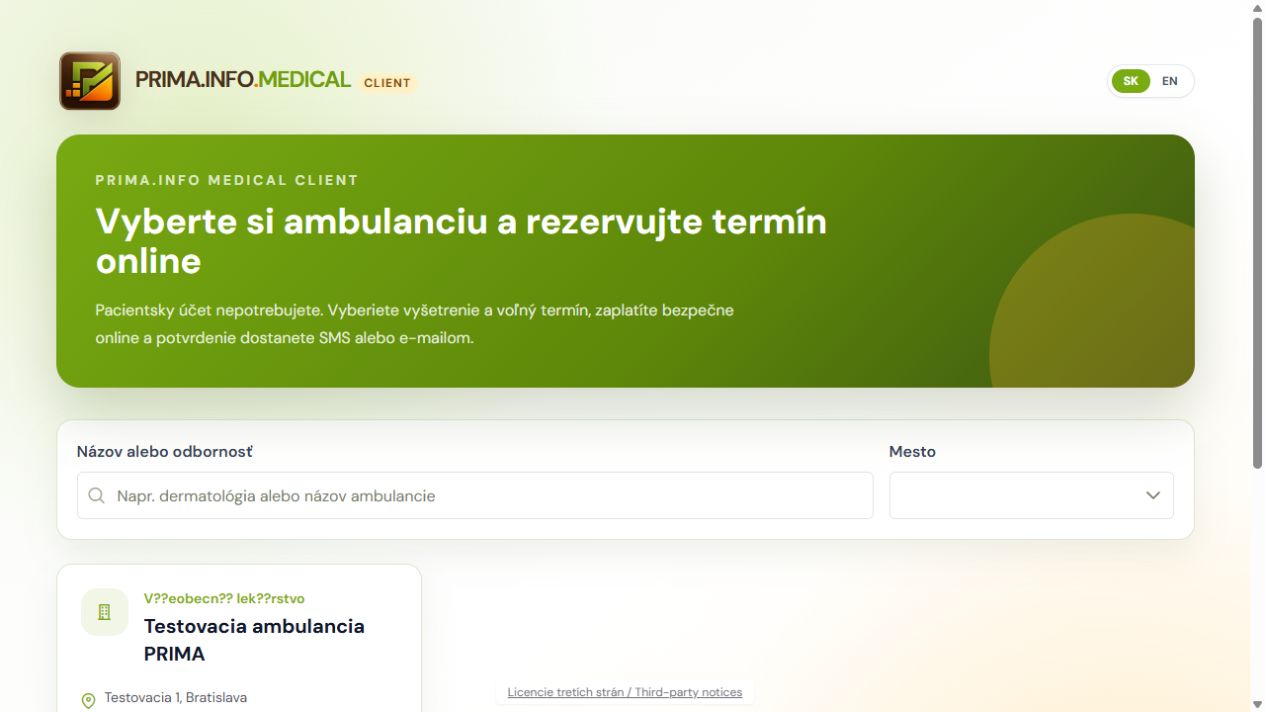
Real Medical Client screen
The patient starts by choosing a clinic.
The public client application searches by name, specialty or city without a mandatory account.
PRIMA.INFO.MEDICAL
What Medical provides to the clinic and patient
Public profile
The clinic publishes its name, specialty, city, address, contacts, examinations and available appointments.
Doctors and examinations
Examination types, doctors, appointment lengths, prices and availability windows.
Client catalogue
Patients find a clinic by name, specialty or city without a mandatory account.
Paid booking
A slot is temporarily held during payment and confirmed only after a signed payment-provider result.
Confirmation and reminder
SMS and email include appointment details, a six-digit PIN and a personal arrival link.
Mobile check-in
The patient can confirm that they are waiting with one click and no patient account.
Clinic waiting room
Booked, waiting and completed states refresh automatically, so staff handle only exceptions.
Waiting-room tablet
An optional app provides PIN check-in without showing a patient list; hardware is not included.
Calendar and availability
Staff manage working windows, public slots, appointments and their organizational status.
AI receptionist
An optional module answers calls, helps with booking, records repeat-prescription requests and hands the request to clinic staff when needed.
Cancellation and refunds
Cancellation and potential refund conditions are shown before payment.
The complete patient journey through the clinic
1. Need
The patient looks for an examination and finds a published clinic in PRIMA.INFO.MEDICAL.CLIENT.
2. Selection
They review the profile, specialty, examination, doctor and available appointments.
3. Details
They choose an appointment and enter essential contact details; no account is required initially.
4. Price and payment
Before confirmation, they see the final price and buy the digital booking service from PRIMA.
5. Confirmation
After a verified payment result, SMS or email provides appointment details, PIN and arrival link.
6. Reminder
The patient receives an organizational reminder and the clinic’s instructions.
7. Arrival
In the waiting room, they use the personal mobile link or enter the PIN on the optional tablet.
8. Waiting room
Medical marks the patient as waiting automatically; staff see the change and handle exceptions.
9. Examination
The clinic provides healthcare in its own name and marks the appointment completed afterwards.
10. Reward
PRIMA separately records and pays the clinic a 92% contractual client-acquisition reward.
Companion applications
A simpler interface for a specific moment.
PRIMA.INFO.MEDICAL.CLIENT
The patient selects a clinic, doctor and appointment, then pays and receives confirmation in the public client application.
Explore Client →PRIMA.INFO.MEDICAL.WAITING.ROOM
The optional application provides self check-in by PIN. Tablet or other hardware is not included in the Medical price.
Explore the tablet →PRIMA.INFO
Pricing
no monthly clinic subscription
final price incl. 23% VAToptional module · fair use up to 1,000 minutes monthly
excl. VAT · €121.77 incl. 23% VAT